Jobie Admin: A Modern UI Template for Hiring Platforms
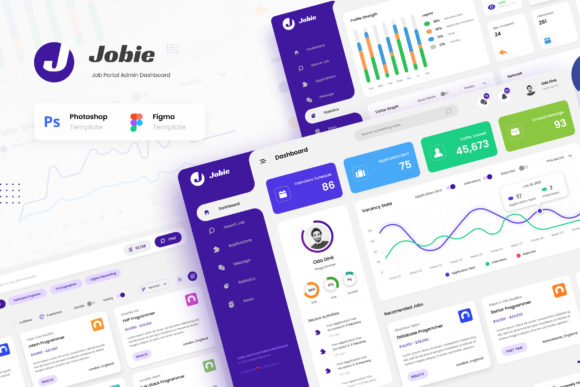
Building a compelling digital platform from the ground up is a significant undertaking. For those creating a job portal, a hiring manager app, or a freelancer marketplace, the user interface is the first point of contact with your users. It needs to be clear, efficient, and professional. The Jobie Admin - Portal Dashboard UI Design template provides a strong visual foundation for this exact purpose. It’s a collection of six modern screens designed to streamline the complex information involved in recruitment and job searching, presenting it in a clean, user-friendly format.
The visual character of Jobie Admin is one of minimalist professionalism. It avoids unnecessary ornamentation in favor of clarity and function. The layout relies on a well-structured grid system, generous white space, and a logical information hierarchy that guides the user's eye naturally from key metrics to detailed lists. The overall appeal is contemporary and trustworthy—qualities essential for any platform dealing with career opportunities and professional data. This isn't just a decorative shell; it's a thoughtfully constructed framework intended to make the user's task easier, whether they are a hiring manager reviewing applications or a candidate searching for their next role.
Where This UI Template Delivers Real Value
The strength of the Jobie Admin - Portal Dashboard UI Design lies in its specific, tailored application. It’s built for the job and recruitment niche, which means every element—from the navigation to the data visualization—is designed with that context in mind. The included screens—Dashboard, Search Job, Applications, Profile, Companies, and Statistics—cover the core user journeys of both employers and job seekers. This makes it an ideal starting point for developers and entrepreneurs building a job portal app, a hiring app, or a career app.
Beyond the primary use case, the template’s clean aesthetic is versatile enough for adjacent projects. A freelancer app could easily adapt the profile and search functionalities. A company's internal HR portal could use the dashboard and applications screens to manage its recruitment pipeline. The design’s focus on data presentation also makes it suitable for any admin dashboard website where clarity and ease of navigation are paramount. By providing a solid visual and structural base, Jobie Admin allows creators to focus on backend development and unique features, confident that the frontend presentation is already polished and user-centric.
Practical Guidance for Implementation
Adopting a UI template is a strategic decision. Here’s how to approach the Jobie Admin template effectively. First, evaluate the project fit. If your platform's core function aligns with job searching, application tracking, or company profiles, this template is a near-perfect match. Its structure is built for these tasks, saving you countless hours of layout design.
The template is provided in PSD and Figma format, two industry standards for design. This offers significant flexibility. Designers comfortable with Adobe Photoshop can work with the layered PSD files, while those preferring a collaborative, vector-based tool will find the Figma files equally robust. Both formats are easy to edit and customize. You can alter the color scheme to match your brand identity, replace placeholder text, and adjust component layouts without starting from scratch.
A critical step in customization is typography. The template uses a free font from Google Fonts, which is a major advantage. This ensures your project has no licensing hurdles and that the typeface is web-optimized for fast loading and excellent readability across devices. When you begin customizing, consider how the existing font pairing works. The chosen fonts likely create a clear visual hierarchy—perhaps a clean sans serif font for body text and a slightly more distinct one for headings. If you choose to change it, test new pairings thoroughly to maintain that hierarchy and ensure legibility at various screen sizes, especially for data-heavy tables and lists.
Finally, leverage the included documentation. A well-documented asset is invaluable. The PDF guide can clarify the file structure, explain design decisions, and speed up your workflow. Remember, all preview images are for demonstration only; you will need to supply your own photography or icons to complete the final look. By treating Jobie Admin as a customizable toolkit rather than a rigid final product, you can efficiently build a stunning and functional interface for your hiring or job portal application.