Elevate Your Projects with Watercolor Photoshop Layer Styles
The Authentic Look of Hand-Painted Art, Instantly Applied
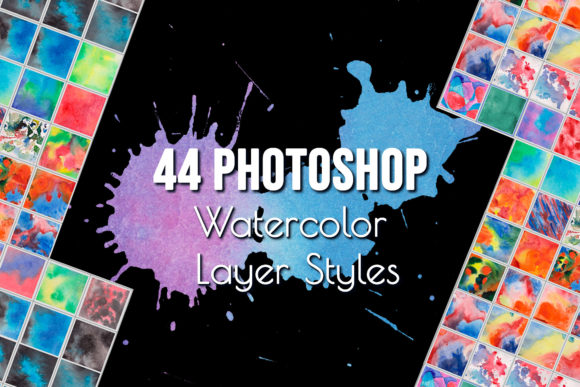
There’s a unique, organic quality to traditional watercolor art that digital designs often struggle to replicate. The subtle bleeds, the delicate texture of pigment settling into paper, and the soft, layered washes of color create a feeling of warmth and authenticity. For designers, marketers, and creators, capturing this aesthetic can be time-consuming, requiring advanced manual techniques. This is where the Watercolor Photoshop Layer Styles Effect provides a practical and powerful solution. It’s not a font, but a set of premium design assets—specifically, a collection of realistic Photoshop styles (.ASL file) designed to transform any layer into a convincing watercolor painting with a single click.
The visual personality of these styles is distinctly artistic and fluid. They mimic the unpredictable nature of watercolors, where colors blend softly at the edges and textures vary across the surface. This creates an effect that feels handmade and personal, moving away from the sterile perfection of flat digital graphics. The overall appeal lies in its ability to add depth, emotion, and a touch of nostalgia or whimsy to a project. Whether you're creating a delicate floral pattern or a bold typographic statement, applying a watercolor style infuses it with character and a sense of crafted care.
Where This Creative Asset Truly Shines
The versatility of the Watercolor Photoshop Layer Styles Effect makes it a valuable addition to any designer's toolkit. Its applications span a wide range of projects, both digital and print. For branding and identity, it can be used to create unique logo designs, especially for businesses in the artisanal, wedding, beauty, or lifestyle sectors. Imagine a logo for a boutique bakery or a handmade soap company that features soft, watercolor-textured lettering—it immediately communicates a brand story of quality and care.
In the realm of marketing and content creation, these styles are incredibly useful. They can generate eye-catching social media graphics, blog post headers, and web backgrounds that stand out in a crowded feed. For publishers and authors, applying the effect to book covers, chapter headings, or promotional materials can set a specific mood, from romantic to ethereal. The styles also work beautifully for creating physical products. Think of custom wedding invitations, greeting cards, decorative art prints, or even patterns for printed fabrics and packaging design. The ability to instantly generate a realistic watercolor texture effect saves hours of manual work while delivering professional, high-quality results.
Practical Guidance for Implementation and Best Results
Integrating the Watercolor Photoshop Layer Styles Effect into your workflow is straightforward. After loading the .ASL file into Photoshop, you simply select the layer you wish to modify—this could be text, a vector shape, a logo, or any other graphic—and click on the desired style from the Styles panel. The effect is applied instantly, preserving the original layer's editability. One of the key strengths here is that it works exceptionally well with a variety of typefaces. You can apply it to a bold sans serif font for a modern look, a elegant serif font for a classic feel, or a flowing script font for added romance.
For optimal results, consider a few practical tips. First, evaluate the contrast and complexity of your base graphic. Very thin, intricate lines might not showcase the watercolor texture as effectively as shapes with more surface area. Testing the styles on different elements of your project is always a good idea to see how the effect interacts with your specific design. Second, think about your color palette. While the styles will apply the texture, the underlying color of your layer will show through. Starting with a rich, solid color often yields the most vibrant watercolor appearance.
When it comes to font pairing, a watercolor-styled headline pairs well with a clean, readable display font or a simple sans serif font for body text. This creates a strong visual hierarchy, allowing the artistic element to capture attention while the supporting text remains clear and legible. Remember, the mock-ups and fonts shown in product previews are for demonstration only; the deliverable is the Photoshop style file itself. Always review the included styles to understand the range of textures and effects available—from subtle, watery washes to more saturated, textured looks.
Finally, consider the context of your project. This effect is perfect for adding a focal point or an artistic accent, but for applications requiring extreme minimalism or ultra-clean corporate branding, it might be used more sparingly. Its strength is in creating an emotional connection and visual interest. By thoughtfully applying the Watercolor Photoshop Layer Styles Effect, you can enhance your brand identity, elevate your editorial design, and create marketing materials that genuinely resonate with your audience, blending the timeless charm of traditional art with the efficiency of modern digital tools.